Med CPD – How to Use the CPD Log
July 27, 2026
How to Use the Med CPD CPD Log
The Med CPD CPD Log helps you keep your professional learning organised in one place.
You can use it as a simple CPD activity record, or as a more complete planning and reflection tool if your profession requires or encourages structured professional development planning.
The CPD Log can help you:
– Record CPD activities
– Track CPD hours and categories
– Reflect on your learning
– Set professional learning goals
– Link activities to your goals
– Review your progress across the year
– Export your CPD record if needed
The CPD Log is designed to support a wide range of health professionals. Some users may mainly use it to record completed activities and hours. Others may use the full workflow to create a Professional Development Plan, complete a self evaluation, set goals, reflect on learning, and review their annual CPD progress.
What the CPD Log Helps You Do
The CPD Log is more than an activity tracker. It helps you build a clear record of your learning and show how your CPD supports your professional development.
You can use the CPD Log to:
– Keep your CPD activities in one place
– Avoid losing track of completed learning
– Record reflections while the learning is still fresh
– Organise CPD activities by goal, category, or year
– Identify new learning needs
– Review what you have achieved
– Keep a record for your own documentation, audit, renewal, appraisal, or professional review requirements where relevant
Use It Your Way: Simple Record or Full CPD Plan
Different professions have different CPD requirements.
Some health professionals need a formal Professional Development Plan, also called a PDP. Others may only need to record CPD activities, hours, reflections, or evidence of learning.
The Med CPD CPD Log can support both approaches.
You can use it as:
– A simple CPD activity log
– A yearly CPD record
– A reflective learning record
– A goal-based learning plan
– A full Professional Development Plan
If you do not need a formal PDP, you can still use the CPD Log to record your CPD activities, track your hours, and keep your learning organised.
If your profession requires or encourages structured planning, you can use the full CPD Log workflow to create a yearly plan, complete a self evaluation, set goals, record activities, reflect, and export your annual record.
How Different Health Professionals Can Use the CPD Log
The CPD Log can be used across a wide range of health professions. The way you use it may depend on your role, professional requirements, and preferred approach to CPD.
Doctors and Medical Specialists
Use the CPD Log to support structured CPD planning, link activities to learning goals, record reflections, and organise categories such as Educational Activities, Reviewing Performance, and Measuring Outcomes where relevant.
Nurses and Midwives
Use the CPD Log to keep a clear record of CPD activities, hours, reflections, and professional learning goals throughout the year.
Pharmacists
Use the CPD Log to identify learning needs, record activities, reflect on how learning applies to practice, and keep a structured record for your own CPD documentation.
Physiotherapists and Allied Health Professionals
Use the CPD Log to record learning across clinical skills, communication, service improvement, supervision, research, and professional development, with reflections linked to your role and clients.
Psychologists
Use the CPD Log to record professional learning, supervision, reflective practice, ethical development, and activities that support your work with clients.
Dentists and Oral Health Professionals
Use the CPD Log to track clinical and professional learning, record reflections, and keep an organised CPD record across the year.
Occupational Therapists
Use the CPD Log to connect learning activities to client-centred practice, functional outcomes, service improvement, assistive technology, and professional development goals.
Aged Care and Disability Support Workers
Use the CPD Log to keep track of training, learning, reflections, and skills development in one place, especially when you need a clear record of completed professional learning.
How the CPD Log Works
The CPD Log follows a simple yearly workflow:
– Create your yearly CPD record
– Complete your self evaluation if useful or required
– Set learning goals if relevant
– Record CPD activities and reflections
– Review your CPD summary
– Export your record if needed
You do not need to use every section in the same way as every other health professional. The CPD Log is designed to give you structure where helpful, while still allowing you to use it as a practical CPD record.
Step 1: Create Your Yearly CPD Record
Start by creating a yearly CPD record. Go to the CPD Log page and click the +Plan
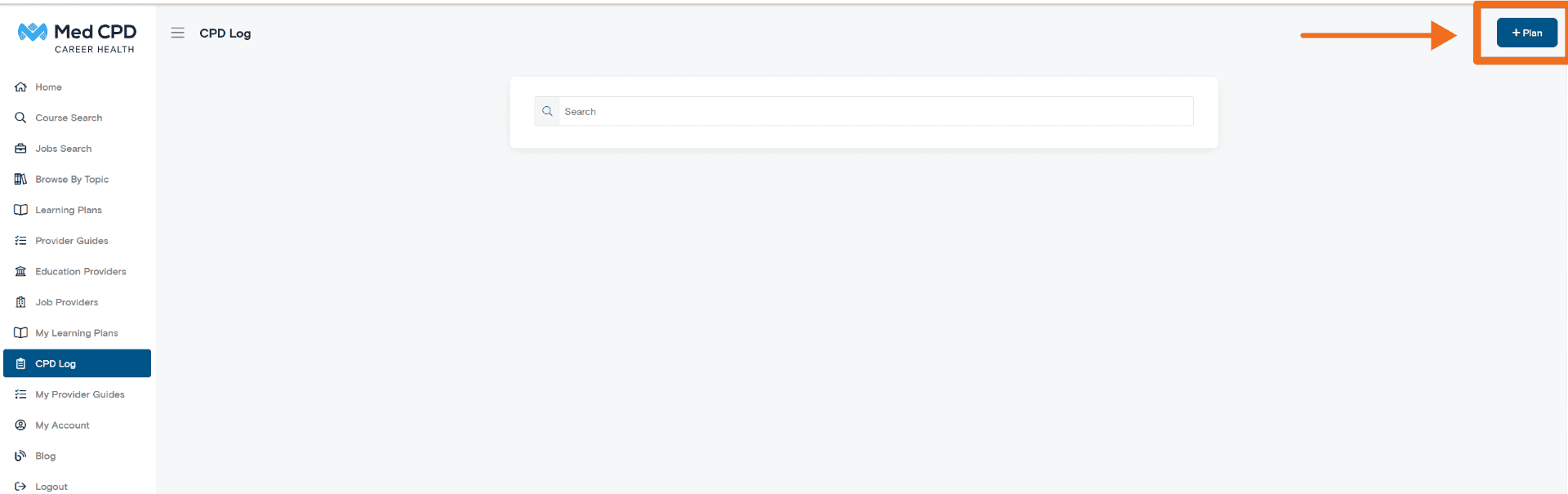
This can be used as a simple activity log or as a more complete Professional Development Plan, depending on your needs and professional requirements.
To create your record:
– Go to the Overview section
– Enter a name for your record
– Select the relevant year
– Save your plan
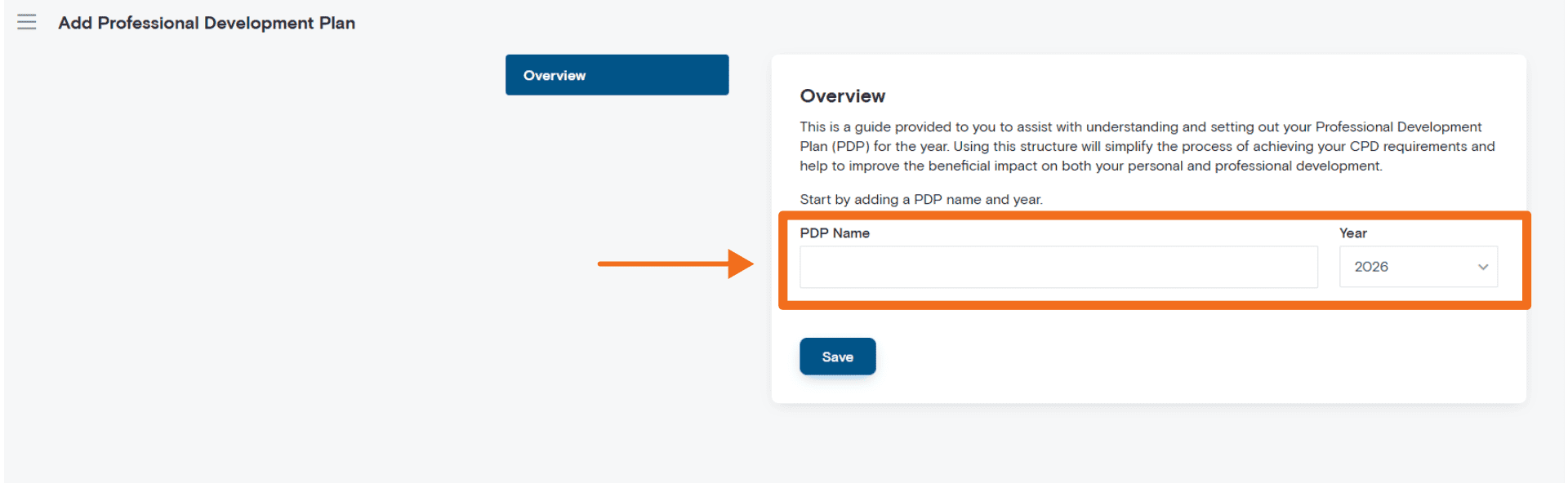
Your record name can be anything that helps you identify it, such as:
– 2026 CPD Record
– Professional Development 2026
– Annual CPD Plan
– 2026 Professional Development Plan
Once saved, your record can be updated throughout the year as you complete CPD activities, add reflections, and review your progress.
If your profession requires or encourages a Professional Development Plan, this yearly record can act as your PDP.
Step 2: Complete Your Self Evaluation
The Self Evaluation section helps you reflect on your current practice and identify learning needs for the year ahead.
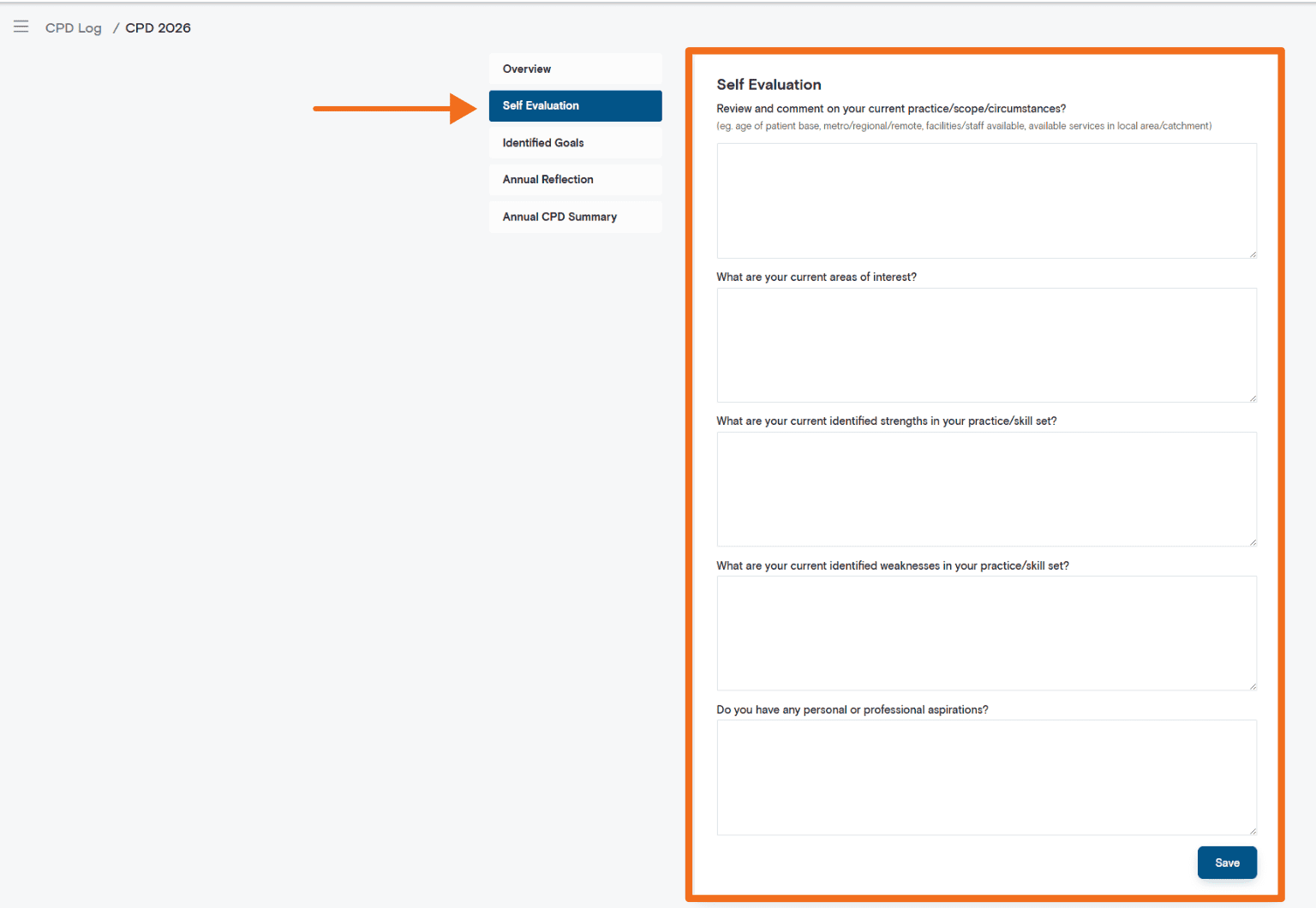
This section is useful if you want to create a more complete CPD record, set meaningful goals, or complete a structured Professional Development Plan.
You may be asked to reflect on:
Your current practice
Consider the context of your work, including:
– Your patient, client, community, or service population
– Your practice setting
– Your location, such as metro, regional, or remote
– Available services and resources
– Changes in your role or responsibilities
This helps provide context for your CPD planning.
Current areas of interest
List areas you are interested in learning more about.
These may include:
– Clinical topics
– New guidelines
– Emerging technologies
– Communication skills
– Leadership or management
– Research, teaching, supervision, or mentoring
– Service improvement or quality improvement
Identified strengths
Reflect on areas where you feel confident, experienced, or effective in your current practice.
Recognising your strengths can help you build on existing skills and identify areas where you may be able to contribute, teach, mentor, supervise, or lead.
Development areas
Consider areas where further learning may benefit your practice.
These may include:
– New guidelines or professional standards
– Skills you would like to strengthen
– Areas of practice you encounter less often
– Changes in your role or professional requirements
– Topics relevant to your patient, client, community, or service group
Personal or professional aspirations
Think about where you would like your career, role, or practice to develop.
Examples may include:
– Expanding your scope of practice
– Improving outcomes in a specific area
– Building leadership skills
– Developing teaching, supervision, or mentoring skills
– Improving communication or teamwork
– Exploring a new area of professional interest
Your self evaluation can help guide the learning goals you set in the next section.
Step 3: Set Your Learning Goals
The Identified Goals section is where you turn your self evaluation into clear CPD goals.
This section is useful if you want to organise your learning around specific outcomes or create a more structured Professional Development Plan.
To add a goal:
– Click + Goal
– Enter a goal name
– Complete the goal details
– Save the goal
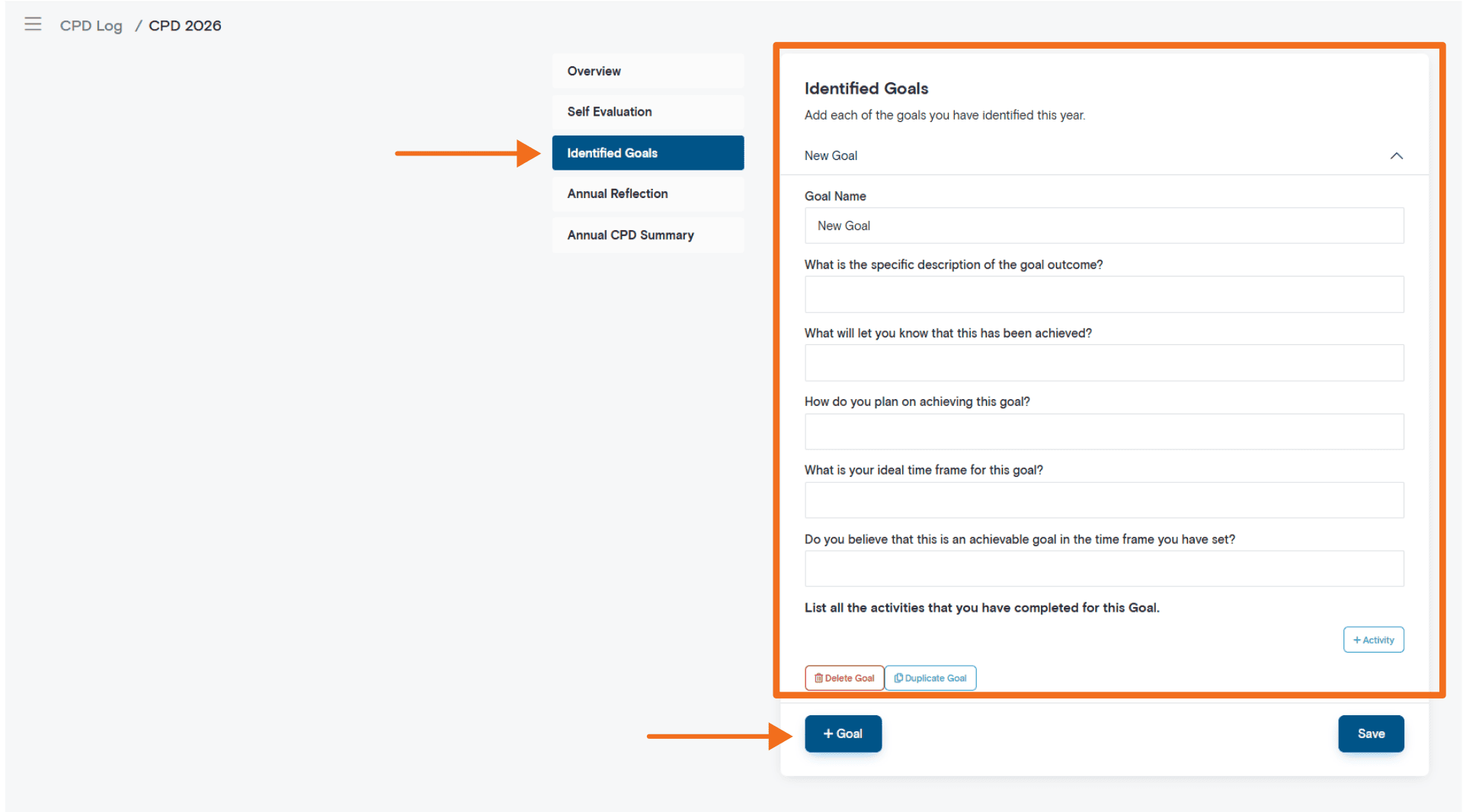
Each goal should describe an area of learning or development you want to work on during the year.
Goal description
Describe what you want to achieve.
Examples may include:
– Improve knowledge of updated guidelines or standards
– Develop skills in a specific area of practice
– Increase confidence managing a particular condition, situation, or client need
– Strengthen leadership, teaching, supervision, or communication skills
– Improve service delivery, safety, quality, or outcomes
Evidence the goal has been achieved
Record how you will know the goal has been met.
This may include:
– Completing relevant CPD activities
– Applying learning in practice
– Reviewing changes in patient, client, service, or practice outcomes
– Receiving feedback
– Completing a course, workshop, assessment, or professional activity
– Updating a process, resource, policy, or approach
Plan to achieve the goal
Outline the steps you plan to take.
This may include:
– Attending courses, conferences, or workshops
– Completing online learning
– Reading guidelines, journals, or professional resources
– Joining peer groups, supervision, case discussions, or professional networks
– Completing reflective activities
– Participating in quality improvement, audit, or service review activities
Timeframe
Set a realistic timeframe for achieving the goal within the year.
This can help you prioritise your learning and review your progress over time.
Achievability
Consider whether the goal is realistic based on your role, available time, resources, and professional priorities.
You can update or adjust your goals during the year if your circumstances or learning needs change.
Step 4: Add CPD Activities
The CPD Log allows you to record activities you complete throughout the year.
Activities may include:
– CPD courses
– Workshops
– Webinars
– Conferences
– Online learning
– Journal reading
– Guideline or standards review
– Peer discussion
– Supervision or mentoring
– Teaching or presenting
– Audit, quality improvement, or service review
– Professional reading or research
– Workplace training
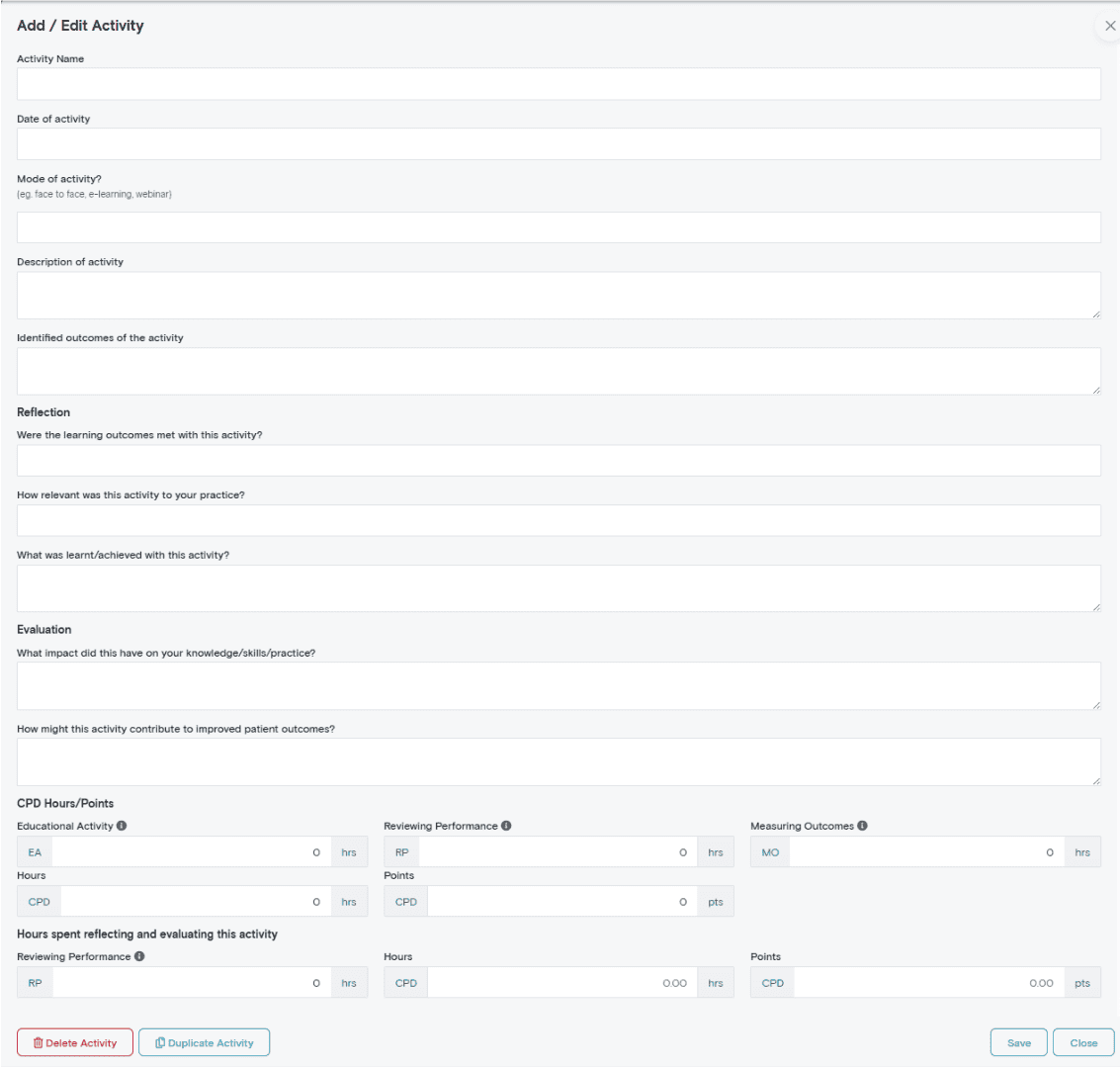
To add an activity, use the + Activity button.
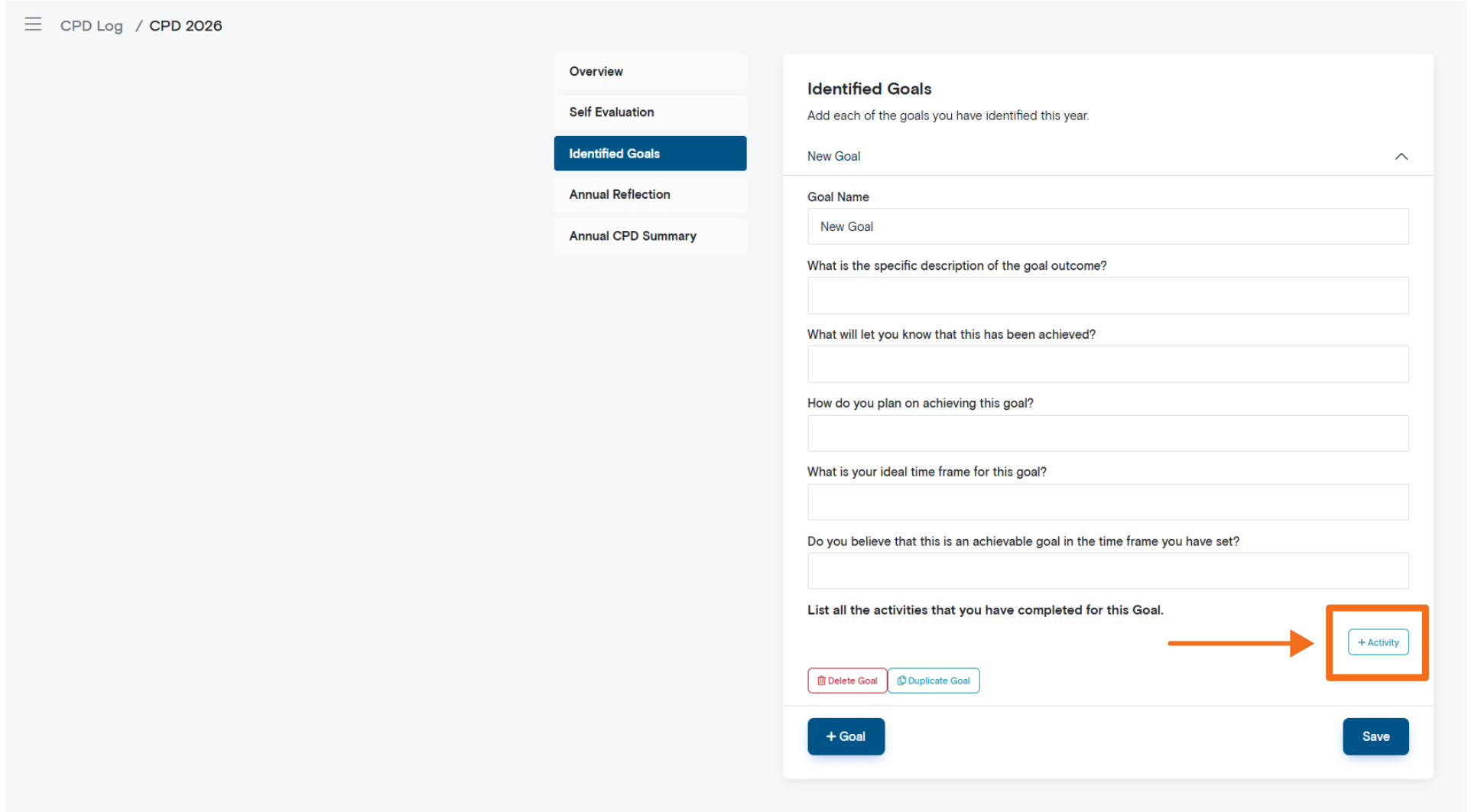
Where possible, you can link activities to the goal they support. This helps show how your learning connects to your broader CPD record or Professional Development Plan.
When recording an activity, include the relevant details, such as:
– Activity name
– Date completed
– Time spent
– CPD category, if relevant
– Reflection or notes
– Any supporting details required for your own records
Step 5: Reflect on Your Learning
Reflection helps show how your CPD activities contributed to your professional development.
Your reflections do not need to be long. A short, specific reflection is often enough to capture the value of the activity.
When adding or reviewing an activity, consider:
– What did you learn?
– Why was this activity relevant to your role?
– How might this learning affect your practice?
– Did it identify any further learning needs?
– Did it help you progress toward one of your goals?
– Could this learning improve patient, client, service, team, or practice outcomes?
Reflection can help turn a completed activity into a more meaningful professional learning record.
Annual Reflection: Review Your Progress
The Annual Reflection section is usually completed toward the end of your CPD year.
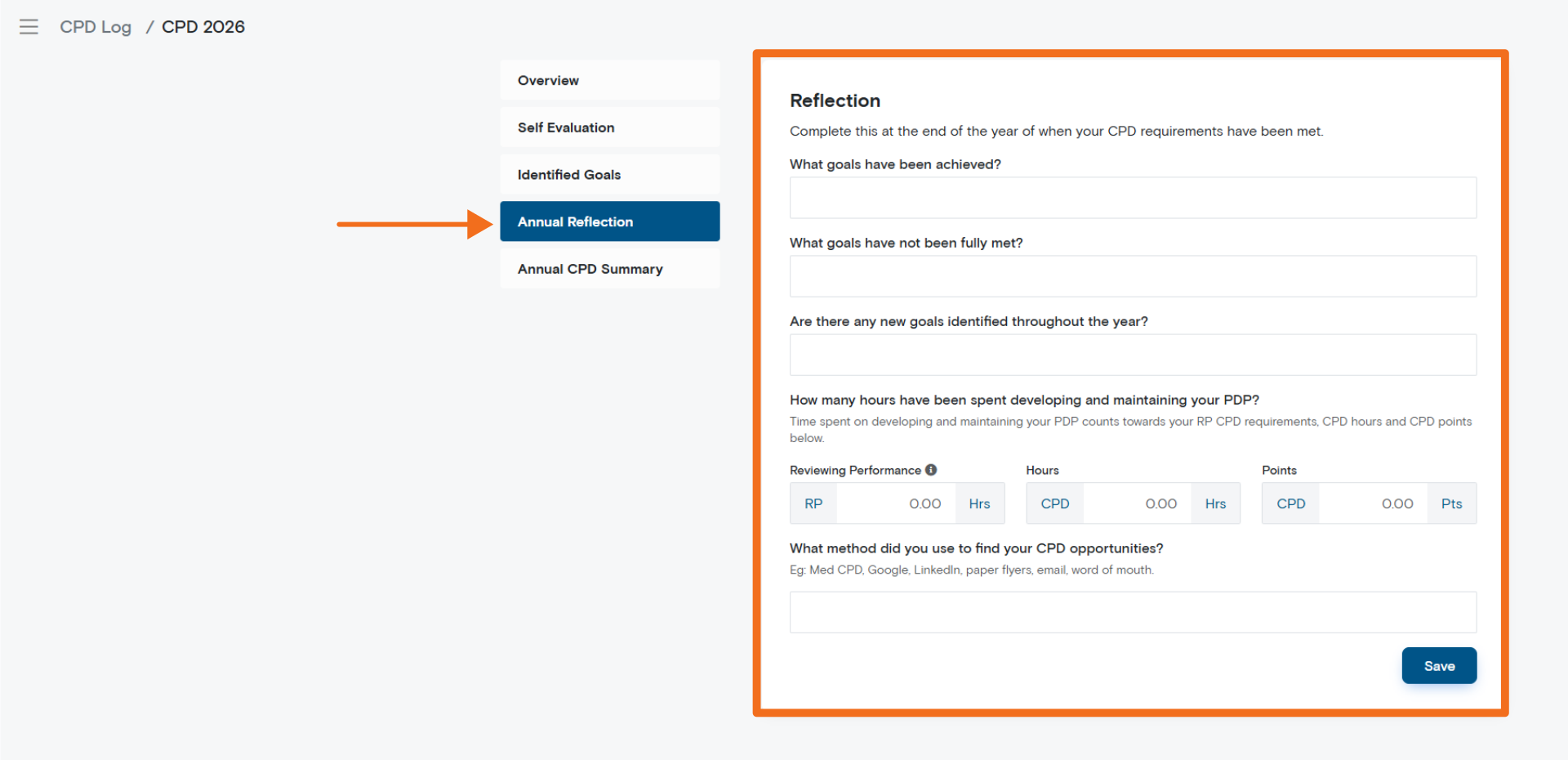
This section helps you review your goals, activities, progress, and new learning needs.
You may be asked to reflect on:
Goals achieved
List the goals you completed during the year and briefly describe how they were achieved.
Goals not fully met
If some goals were not completed, record why.
This may include changes in workload, availability, role requirements, personal priorities, or emerging learning needs.
Unmet goals can help inform your next yearly CPD record or Professional Development Plan.
New goals identified
Some learning needs emerge during the year.
Record any new goals or areas of interest that were identified through your CPD activities, reflections, professional feedback, supervision, workplace changes, or changes in practice.
Time spent reviewing your performance
You may record time spent reviewing, updating, and maintaining your CPD record where applicable to your CPD requirements.
This may include reviewing your goals, reflecting on your practice, updating your learning plan, completing your annual review, or reviewing performance and outcomes.
How you found CPD opportunities
You can record how you discovered CPD activities, such as:
– Med CPD
– Google
– LinkedIn
– Email invitations
– Conferences
– Colleagues or word of mouth
– Professional organisations
– Workplace training
– Supervisors, peers, or professional networks
This can help you understand where your learning opportunities are coming from and plan future CPD more effectively.
Annual CPD Summary: Review Your CPD Hours
The Annual CPD Summary gives you a snapshot of the CPD activities recorded in your plan.
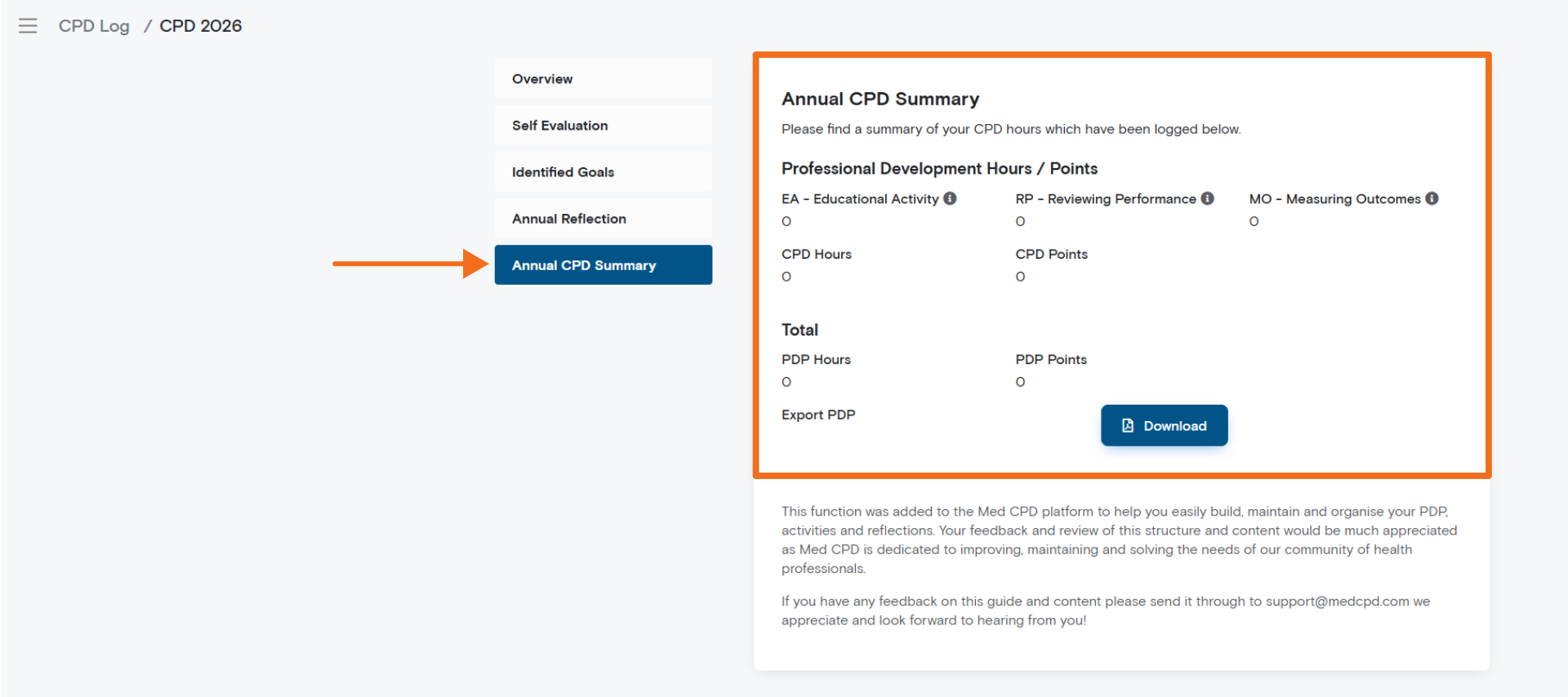
Depending on your professional requirements and the information entered, your summary may include:
– CPD hours
– CPD categories
– CPD points, where relevant
– Educational Activities
– Reviewing Performance
– Measuring Outcomes
Some professions use specific categories or activity types to organise CPD. Where relevant, these categories can help you review your progress and understand whether further activities may be needed.
This section helps you quickly review your CPD activity for the year.
Exporting Your CPD Record
You can export your CPD record by selecting Download.
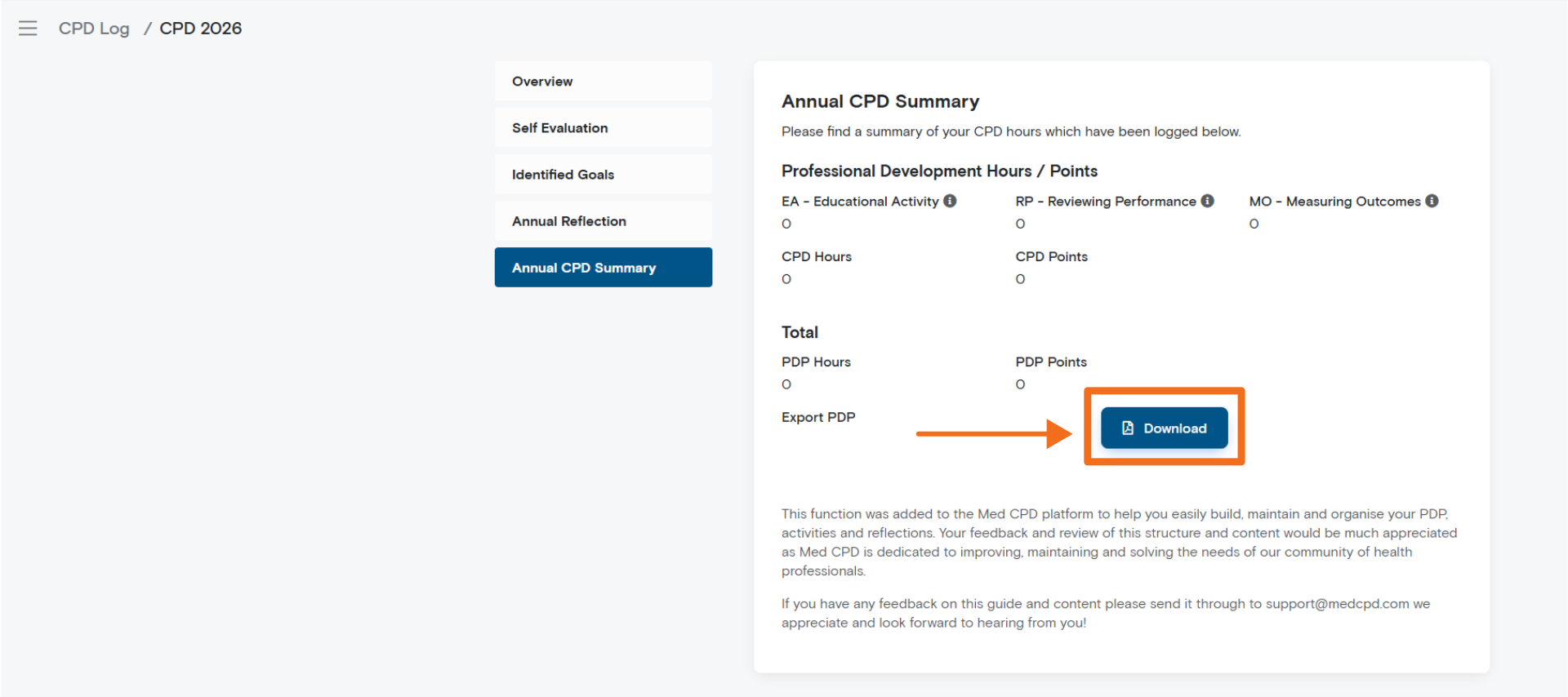
Your exported record may include:
– Your CPD record or PDP details
– Self evaluation responses
– Learning goals
– CPD activities
– Reflections
– CPD hours and categories
– Annual reflection
You can keep this export for your own records or use it to support professional documentation requirements where relevant.
Summary
The Med CPD CPD Log provides a structured way to record, track, and reflect on your continuing professional development throughout the year.
You can use it as a simple CPD activity log or as a more complete Professional Development Plan, depending on your needs and professional requirements.
By recording activities, setting goals where relevant, adding reflections, and reviewing your progress, you can keep your CPD organised in one place and maintain a clearer record of your professional learning.
To get started, create your yearly CPD record in the Overview section, then complete the sections that are most useful for your role, profession, and CPD requirements.
Share to: