Med CPD – How to use the Auto CPD Log
July 29, 2026
Auto CPD Log Guide
Capture the Learning You’re Already Doing
Healthcare professionals regularly search clinical questions, review guidelines, read articles, and investigate unfamiliar topics as part of their everyday work.
This learning may happen during a consultation, between patients, before starting work, or when following up a clinical question later.
Med CPD’s Auto CPD Log helps capture this learning as it happens by recording your searches, topics explored, and eligible learning time within the Med CPD platform.
It creates a clearer record of:
– What you searched for
– The topics you explored
– When the activity occurred
– How much time you spent learning
– The sources and resources you saved
You can then return to this activity when reviewing your professional development, preparing CPD reflections, or organising your learning records.
What Is Auto CPD Log?
Auto CPD Log is an AI-powered search and learning tool designed to help healthcare professionals find answers, resources, and educational material more efficiently.
You can use it to search:
– Clinical questions
– Guidelines
– Research topics
– Journal articles
– Evidence summaries
– Treatment approaches
– Professional learning resources
– Broader areas of practice or professional interest
As you search and explore readable content within Med CPD, your activity is organised into your personal Auto CPD Log.
This reduces the need to remember or reconstruct your learning weeks or months later.
Why Use Auto CPD Log?
A significant amount of professional learning happens outside formal courses, conferences, and scheduled education.
Examples include:
– Reviewing a clinical guideline
– Looking up an uncommon presentation
– Reading about a new medication
– Comparing treatment approaches
– Refreshing your knowledge during a consultation
– Investigating new evidence
– Following up a clinical question
– Exploring a new area of practice
– Reading further after a professional discussion
These activities can represent meaningful self-directed learning, but they are often not recorded at the time.
Auto CPD Log helps create a supporting record of the searches undertaken, topics explored, and time spent engaging with learning material.
You should still review each activity and decide how it relates to your learning goals and applicable CPD requirements.
Using the Auto Log Search
Begin by entering a clinical question, research topic, guideline, article, or learning need into the Auto Log Search.
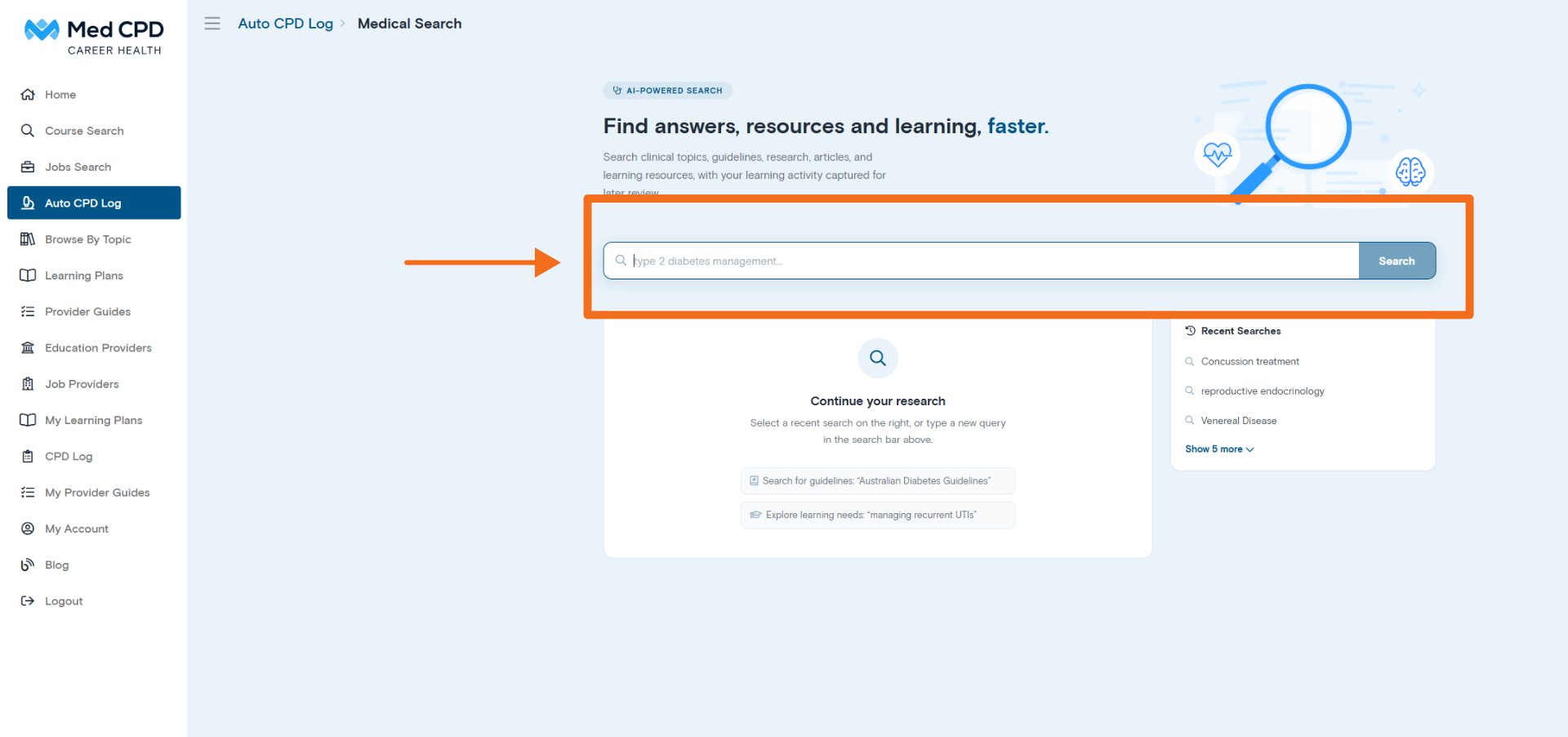
For optimal results, include relevant context, ask a specific question, and explain what you want to understand.
For example, instead of searching:
Diabetes
Try:
What are the current Australian recommendations for managing type 2 diabetes in an adult who is not achieving their HbA1c target with metformin alone?
Other examples include:
– What are the current Australian asthma management guidelines for adults?
– What are the evidence-based treatment options for plantar fasciitis?
– How should hypertension be managed in an older adult with chronic kidney disease?
– What are the current return-to-play recommendations following concussion?
– What is the recommended assessment approach for persistent unilateral leg swelling?
– More detailed searches usually produce more focused and relevant results.
– You can also ask follow-up questions to clarify an answer, compare options, explore limitations, or investigate a topic in greater depth.
Automatic Learning-Time Logging
Learning-time logging begins when you submit a search through the Auto Log Search.
While you continue exploring readable content within the Med CPD platform, Auto CPD Log records information associated with that activity, including:
– Your search terms
– The date of the activity
– The topic explored
– The time spent engaging with the content
– Sources saved within the platform
This creates a clearer record of the learning activity completed through Med CPD.
Rather than estimating your learning time at the end of the month or trying to remember individual searches later in the year, you can review the activity that was logged as it occurred.
This record can support CPD reflection, help you revisit previous research, and show how your self-directed learning has developed over time.
Important Limitation for External Websites
Auto CPD Log can only record activity completed within the Med CPD platform and within resources that can be opened and read through the platform.
Some websites or publishers prevent their content from being displayed within Med CPD.
When a resource must be opened directly on an external website, Med CPD cannot verify or log the time you spend reading or interacting with that website.
Your original search may still appear in your Auto CPD Log, but time spent on an external website cannot be added to your recorded Med CPD learning time.
Where external reading forms an important part of your learning, you may need to document that activity separately.
Viewing My Auto CPD Log
The My Auto CPD Log page provides an organised history of your recorded learning activity.
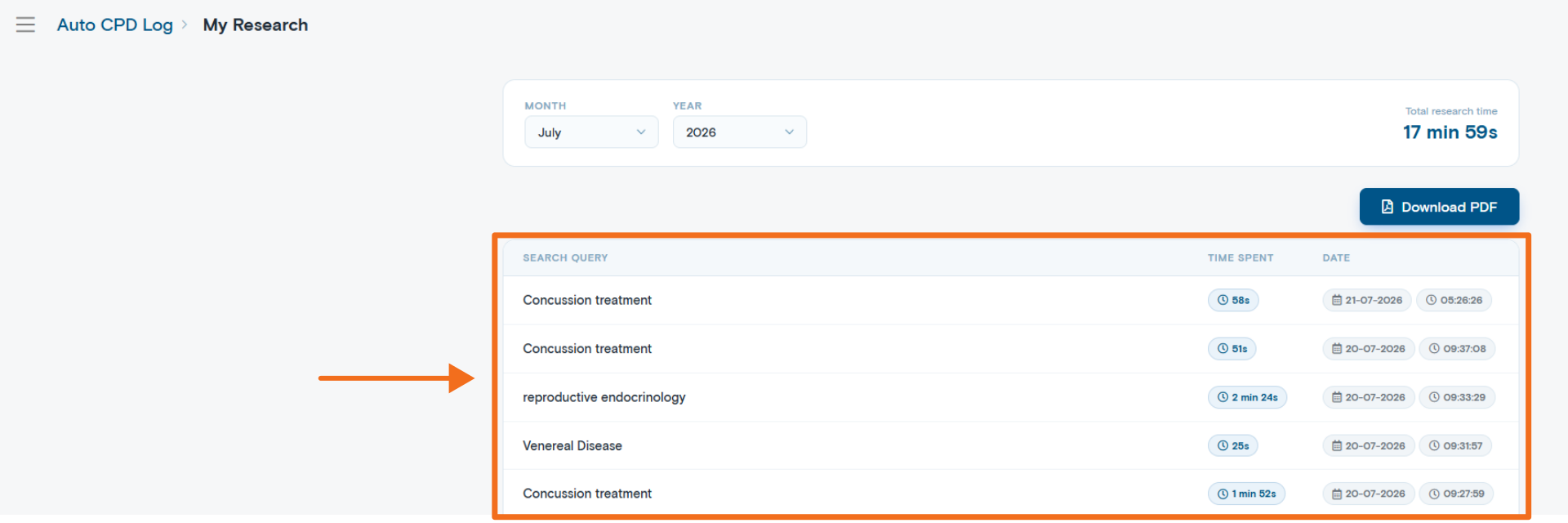
You can review:
– Your previous searches
– The topics you explored
– The date of each activity
– The time logged against individual searches
– Your collective learning time for the selected month
You can also change the month and year filters to review previous activity.
My Auto CPD Log can help you:
– Revisit an earlier clinical question
– Find a topic you previously researched
– Review the time invested in self-directed learning
– Identify recurring areas of interest
– Recognise potential learning gaps
– Prepare CPD reflections and records
Monthly Activity Summary
Your Auto CPD Log includes a monthly activity summary showing the total time spent researching and learning through Med CPD during the selected month.
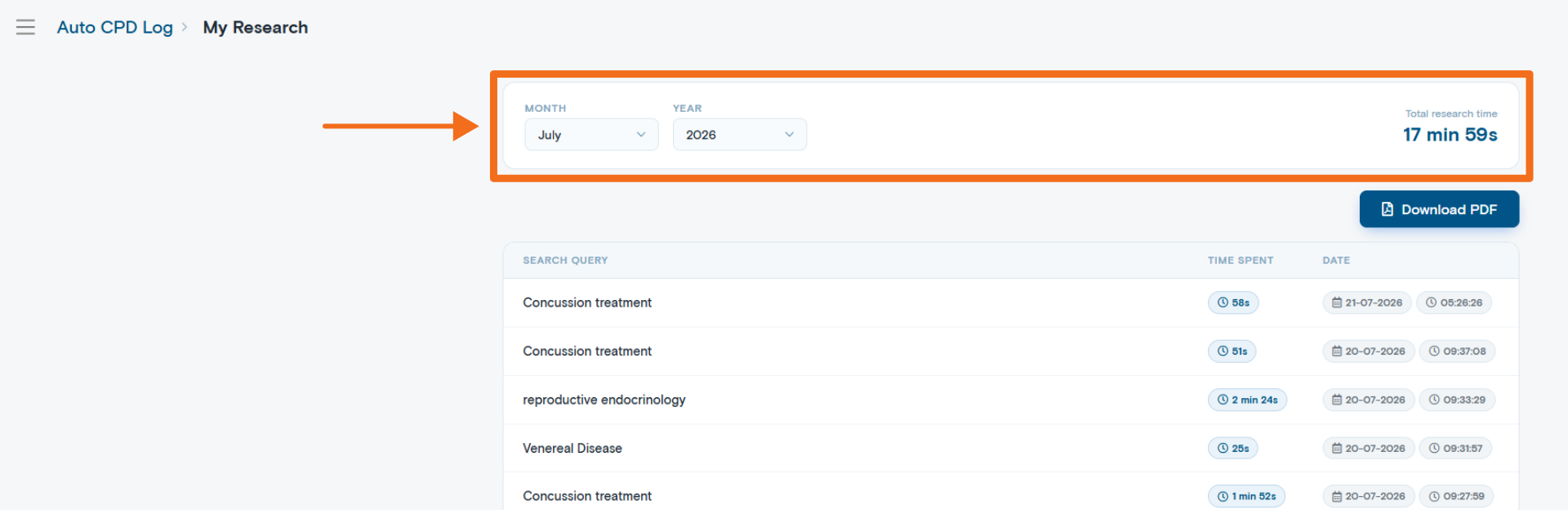
You can change the month and year filters to review earlier activity and see how your learning has developed over time.
The monthly activity summary can help you:
– Recognise how much self-directed learning you complete
– Review changes in your learning activity
– Identify periods of increased research
– Understand which topics receive the most attention
– Prepare more accurate CPD reflections and records
Med CPD is also developing an annual calendar-year summary, which will provide a broader overview of your recorded activity across the year.
Downloading Your Auto CPD Log
The Download PDF option allows you to export your Auto CPD Log for the selected month.
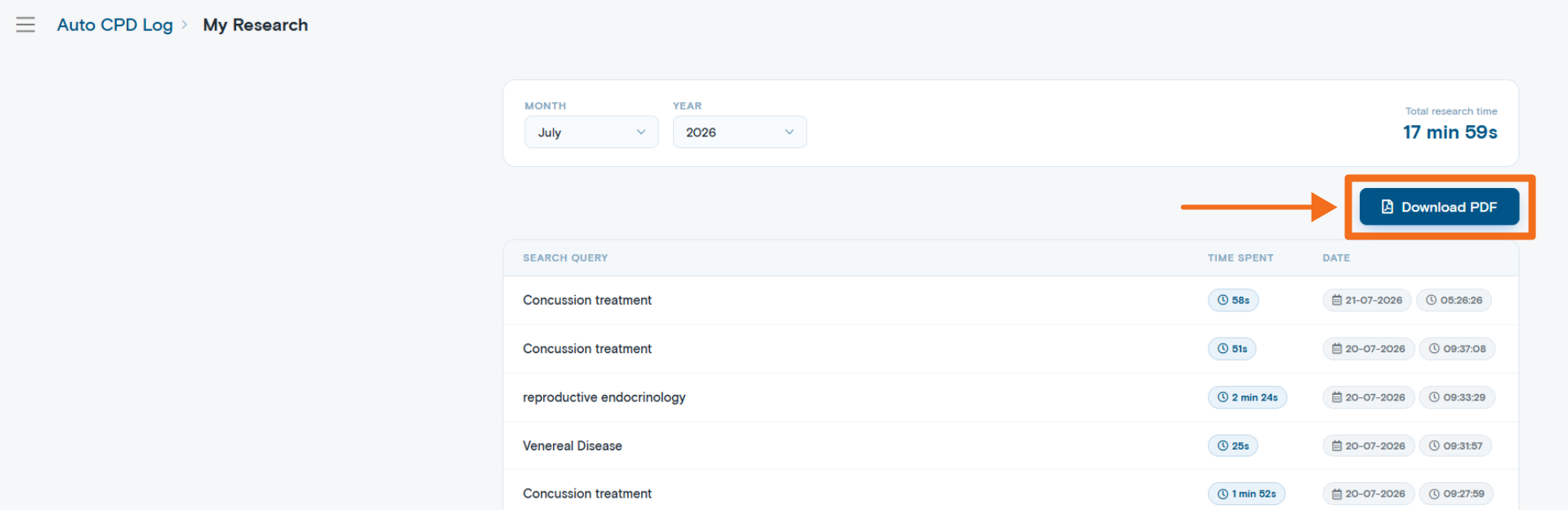
Depending on the activity recorded, the PDF may include:
– Search topics
– Research dates
– Time logged
– Individual activity details
– Monthly learning-time totals
The download can be retained as a personal record or used as supporting information when preparing your CPD documentation.
An annual calendar-year summary download is also being developed. Once available, this will allow you to export a consolidated record of your activity across the year.
The exported log records activity completed through Med CPD. You remain responsible for reviewing the information and determining how it should be classified or reported under your applicable CPD requirements.
Saving Useful Resources
Not every article or source needs to be revisited, but some resources are worth keeping.
When you find a useful source, you can save it to your Saved Sources.
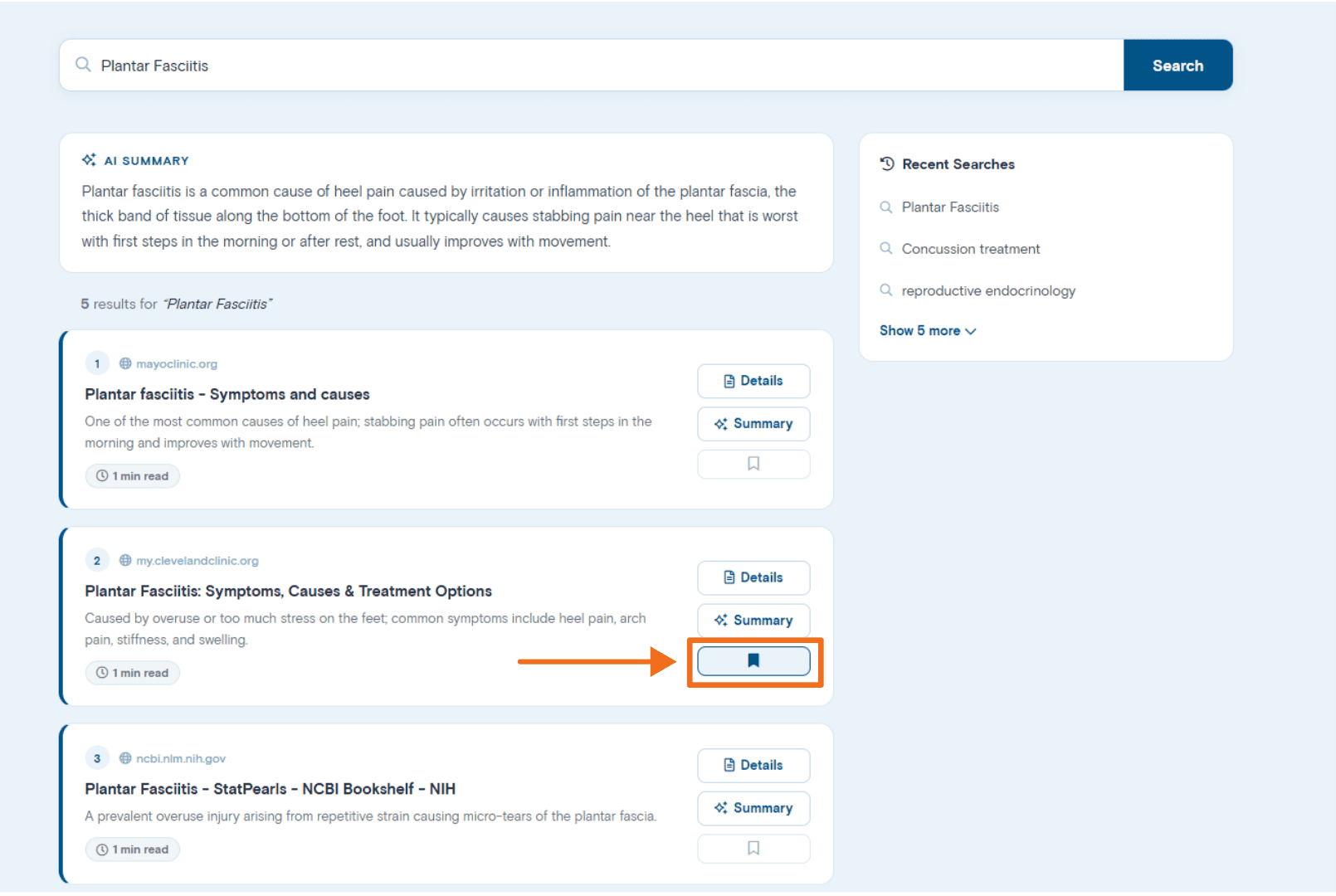
This allows you to build a personalised reference library containing material relevant to your practice, professional interests, and ongoing learning.
Saved Sources can help you avoid repeating a search months later when you need to find the same guideline, article, or reference again.
Med CPD is continuing to improve this area of the platform. Further changes will be introduced to make saving, organising, reviewing, and returning to useful resources easier.
Managing Your Saved Sources
A saved source may include:
– The article or resource title
– The source website or publisher
– A summary of the content
– The date it was saved
– A link to revisit the resource
You can also remove sources you no longer need.
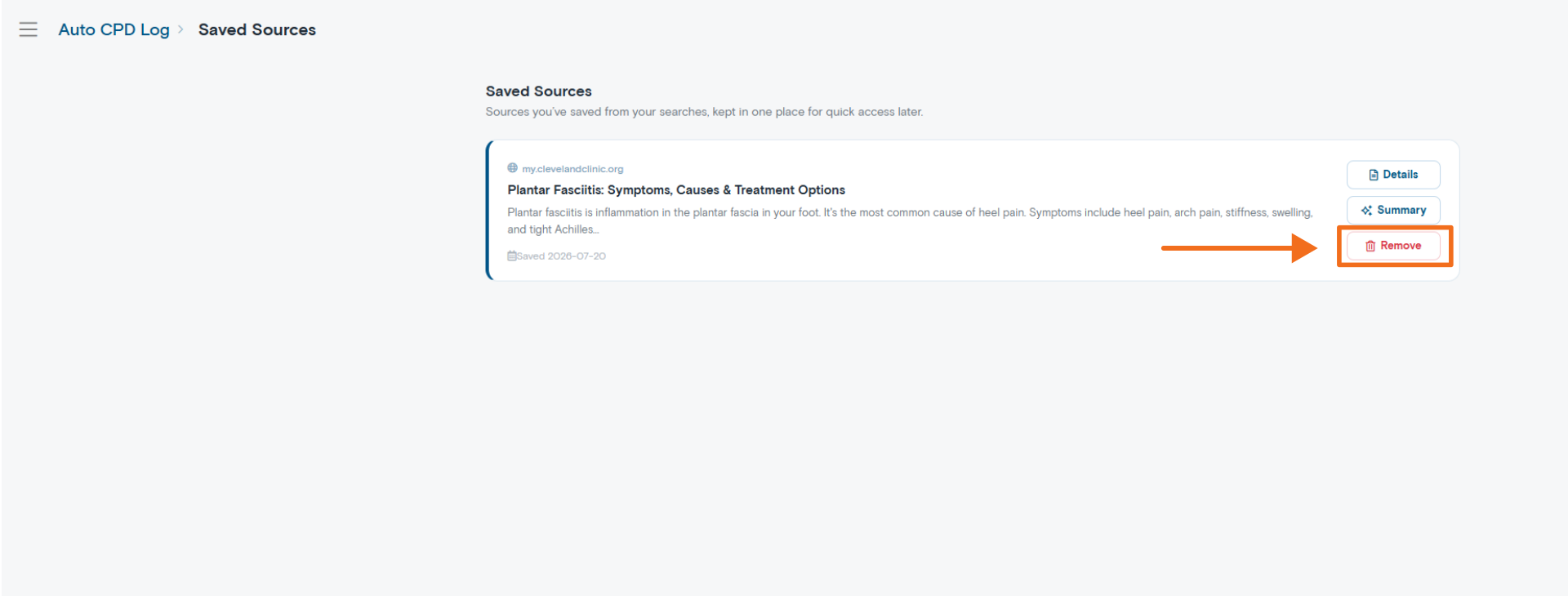
Over time, your Saved Sources can become a curated collection of guidelines, articles, evidence summaries, and professional resources relevant to your work.
This functionality will continue to be refined as improvements are released.
Practical Ways to Use Auto CPD Log
Healthcare professionals can use Auto CPD Log in a range of clinical, professional, and educational situations.
During a Consultation
You may be in the middle of a consultation and need to:
– Check a current guideline
– Confirm a recommendation
– Review a medication or treatment option
– Explore a differential diagnosis
– Find a professional reference
– Read further about an unfamiliar presentation
Instead of moving between multiple search tools, you can use Auto Log Search to find relevant professional sources while keeping your learning activity organised in one place.
You can leave Med CPD open during your working day and return whenever a question arises.
Your searches and eligible learning activity can then be recorded within My Auto CPD Log.
Auto Log Search should support, rather than replace, your clinical judgement, local policies, authoritative guidance, and patient-specific decision-making.
Following Up After a Consultation
A patient interaction may raise a question that requires more detailed reading than can reasonably be completed during the appointment.
You can return to the topic later, explore it in greater depth, and retain a clearer record of the learning that followed.
Staying Up to Date
Search for new guidelines, emerging evidence, recent publications, and changes relevant to your area of practice.
Supporting Professional Development
Build an ongoing record of your self-directed learning throughout the year rather than trying to recreate it retrospectively.
Exploring New Areas of Practice
Research topics outside your usual work as you expand your skills, prepare for a new role, or develop a new professional interest.
Preparing for Formal Education
Research a topic before attending a course, webinar, conference, or workshop to identify your current knowledge and learning needs.
Following Up Formal Education
Explore questions that arise after a course or educational activity and retain useful references for later review.
Building a Personal Knowledge Library
Save valuable articles, guidelines, and professional resources so they remain accessible when you need them again.
Identifying Learning Patterns
Review My Auto CPD Log to recognise recurring questions, common areas of uncertainty, and topics that may benefit from more structured education.
Tips for Getting the Most from Auto Log Search
Include Relevant Context
The most effective way to improve your results is to provide enough context.
Broad searches may return broad answers. Specific questions are more likely to produce focused and relevant information.
Instead of:
Hypertension
Try:
What are the recommended first-line treatments for hypertension in an Australian adult with type 2 diabetes and chronic kidney disease?
Where relevant, include:
– Patient population
– Age group
– Clinical setting
– Symptoms or presentation
– Relevant comorbidities
– Country or guideline jurisdiction
– Intervention being considered
– Type of evidence required
Ask a Specific Question
Clearly state what you are trying to understand.
For example:
– What are the current Australian recommendations?
– How do these two treatment options compare?
– What are the benefits and risks?
– What assessment approach is recommended?
– What does the recent evidence suggest?
– Where is the evidence uncertain?
Explain the Outcome You Need
Tell the search what kind of answer would be most useful.
For example:
– Provide a practical overview
– Summarise the current guideline
– Compare two treatment approaches
– Identify recent review articles
– Explain the evidence in plain language
– Provide sources for further reading
Ask Follow-Up Questions
You do not need to include every detail in one search.
Use follow-up questions to:
– Clarify a recommendation
– Narrow the population
– Compare alternatives
– Request more detail
– Ask for primary sources
– Explore conflicting evidence
– Investigate limitations
Use It When Questions Arise
Small, regular research sessions can build a valuable record of your professional learning.
Using Auto Log Search during your normal working day can provide a more accurate picture of the learning you are already completing.
Keep Readable Content Open Within Med CPD
Where a source can be read within the Med CPD platform, continue reviewing it there so the associated learning time can be logged.
When you open a source directly on an external website, the time spent on that website cannot be verified or recorded by Auto CPD Log.
Save High-Quality Resources
Save guidelines, systematic reviews, trusted clinical references, and articles you are likely to use again.
Before relying on a source, consider:
– Authority
– Recency
– Relevance
– Jurisdiction
– Applicability to your scope of practice
Review Your Monthly Activity
Regularly review My Auto CPD Log rather than waiting until the end of the CPD year.
This can help you:
– Confirm that your activity has been captured
– Identify topics suitable for reflection
– Recognise gaps in your learning
– Plan further professional development
– Export records while the context remains familiar
Apply Your Professional Judgement
AI-supported search can help you find and understand information, but it should not be treated as a substitute for clinical judgement or authoritative guidance.
Review the original sources, confirm that the information is current, and consider whether it applies to your profession, location, scope of practice, clinical setting, and individual patient circumstances.
Frequently Asked Questions
When does learning-time logging begin?
Logging begins when you submit a search through Auto Log Search.
Eligible activity can then be recorded while you explore readable content within the Med CPD platform.
Does Auto CPD Log record time spent on external websites?
No.
If a source cannot be opened and read within Med CPD, the platform cannot verify or log the time spent on the external website.
Your original search may still appear in your history, but external browsing time will not be included in your recorded learning time.
Can I use the log as evidence of my learning?
My Auto CPD Log provides a supporting record of your searches, topics, dates, and eligible learning time within Med CPD.
You should review each activity and determine how it relates to your learning goals and applicable CPD requirements.
The log does not independently certify that an activity meets the requirements of a particular CPD home, professional body, or regulator.
Can I review previous searches?
Yes.
My Auto CPD Log stores your recorded search history, allowing you to revisit previous topics and review your learning time.
Can I view my total learning time?
Yes.
Your monthly activity summary displays the collective learning time recorded for the selected month.
Can I save useful articles?
Yes.
You can save relevant resources to your Saved Sources. Med CPD is continuing to improve this functionality, with further enhancements planned.
Can I export my Auto CPD Log?
Yes.
You can download a PDF containing activity from the selected month.
An annual calendar-year summary and download are also being developed.
Does Auto Log Search replace clinical guidelines or professional resources?
No.
It is a tool for finding, exploring, and organising information.
Healthcare professionals should continue to review original sources and use appropriate clinical guidelines, local protocols, professional judgement, and patient-specific assessment when making decisions.
Summary
Auto CPD Log helps capture the research and study you are already completing as part of your everyday work.
It records your searches, topics explored, and eligible learning time within Med CPD, creating a clearer record for later review.
Use Auto Log Search when a question arises, explore the available sources, save useful resources, and return to My Auto CPD Log when preparing your CPD reflections or records.
It is a practical way to make your day-to-day learning more visible, organised, and easier to revisit.
Share to: