
Med CPD – How to Browse CPD Courses
July 10, 2026
How to Browse CPD Courses on Med CPD
The Browse page helps you discover CPD activities when you want to explore what is available, rather than search for a specific course, provider, or topic.
While Search is useful when you already know what you are looking for, Browse is designed for discovery. It allows you to explore CPD opportunities by profession, topic area, and learning interest, helping you find activities that may support your professional development goals.
From the Browse page, you can:
– Explore CPD activities by profession or topic
– Discover learning opportunities you may not have searched for directly
– Compare activities within a specific area of interest
– Sort results by relevance, quality, popularity, date, or title
– View course details and bookmark activities for later
Whether you are planning your CPD for the year, looking for new learning ideas, or simply exploring what is available, Browse gives you an easy way to navigate CPD activities across Med CPD.
What the Browse Page Helps You Do
Browse is designed to make CPD discovery easier.
Instead of needing to know the exact course title, provider, or keyword, you can start with a profession or topic area and review the activities available within that category.
This can be useful when you:
– Want to discover CPD activities you may not have searched for directly
– Are exploring a new area of professional interest
– Need ideas for upcoming CPD activities
– Want to compare multiple CPD options before deciding
– Are planning your CPD over a longer period
– Want to see what learning opportunities are available across different topic areas
Many health professionals know the type of learning they are interested in, but not the exact course they want to complete. Browse helps bridge that gap by presenting CPD activities in an organised and easy-to-explore format.
If you already have a specific course, provider, or topic in mind, Search may be the faster option. If you want to explore available learning opportunities, Browse is the best place to start.
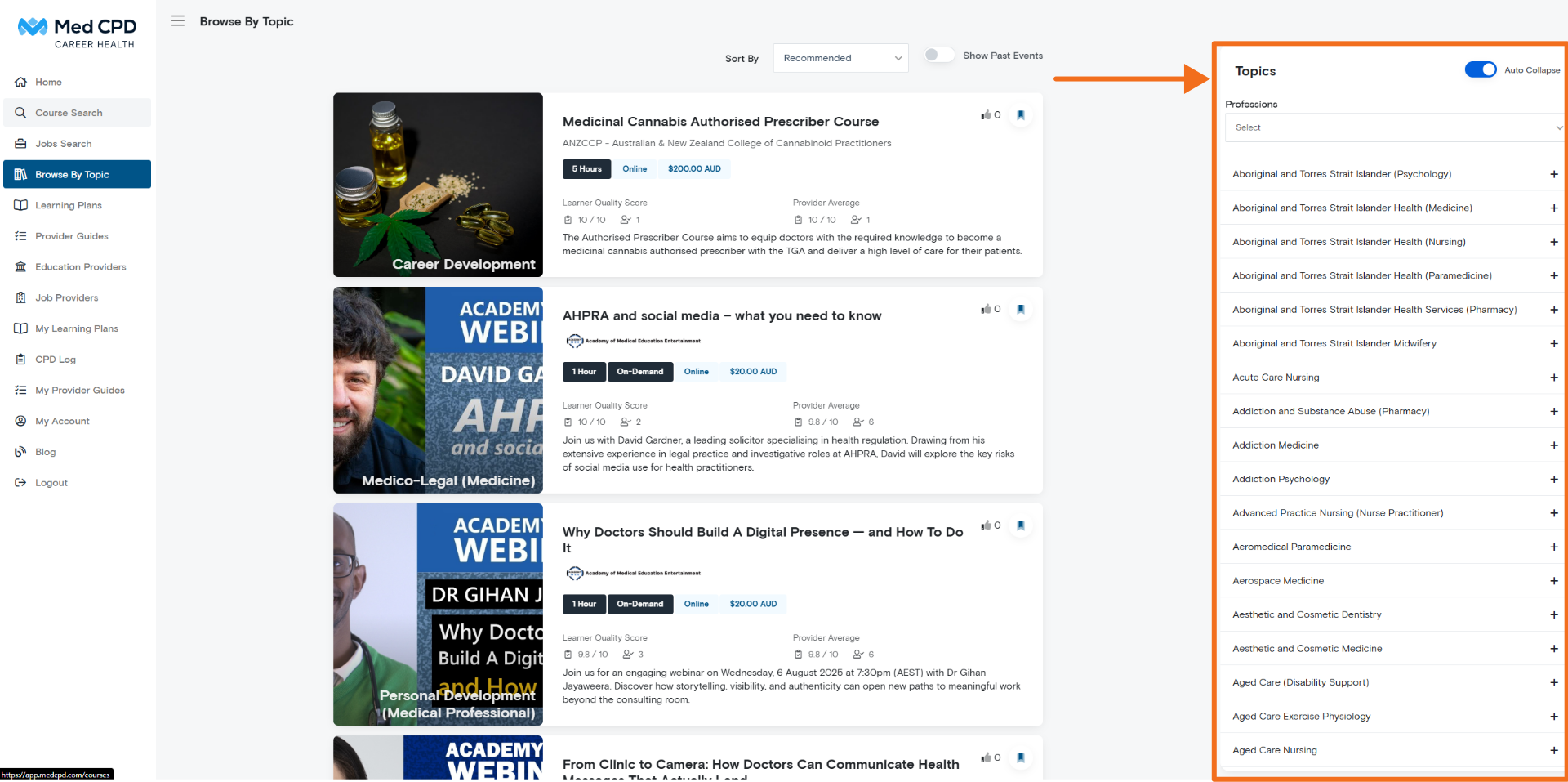
Explore CPD by Profession and Topic
CPD activities on Med CPD are organised into broad profession-based areas and relevant topic categories.
This helps you focus on activities that are more likely to align with your role, interests, scope of practice, or learning needs.
For example, you may see topic areas connected to different healthcare professions, clinical areas, or professional development interests. From there, you can open a topic and view the CPD activities listed within that area.
This structure helps you:
– Find CPD activities more efficiently
– Focus on content that is more relevant to your professional role
– Explore learning opportunities within a specific area of interest
– Discover activities you may not have searched for by keyword
– Compare available options within the same topic area
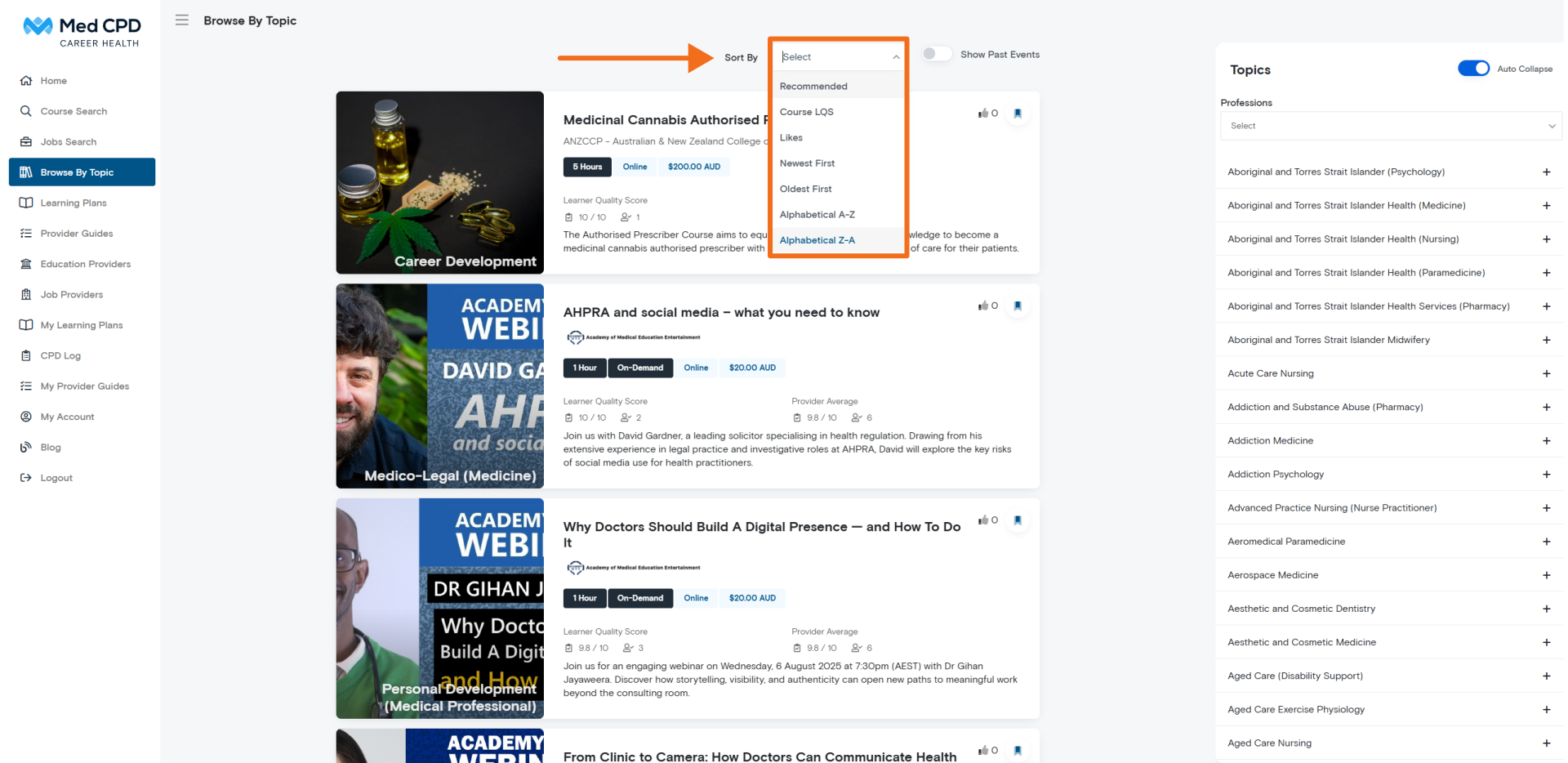
Sort Results to Match Your Needs
Once you are viewing a list of CPD activities, you can sort the results based on what matters most to you.
Available sorting options may include:
– Recommended – prioritises activities based on general relevance
– LQS – sorts activities by Learner Quality Score, where available
– Likes – shows activities other users have engaged with positively
– Newest / Oldest – sorts activities based on when they were added
– Alphabetical – sorts activities by title
These sorting options allow you to browse CPD activities in different ways depending on your needs.
For example:
– Use Recommended when you want a general starting point
– Use LQS when you want to consider learner quality feedback
– Use Likes to see activities other users have found useful
– Use Newest if you want recently added content
– Use Alphabetical if you are scanning for a specific activity or title
Sorting helps you move from broad exploration to a more focused list of CPD options.
View and Save CPD Activities
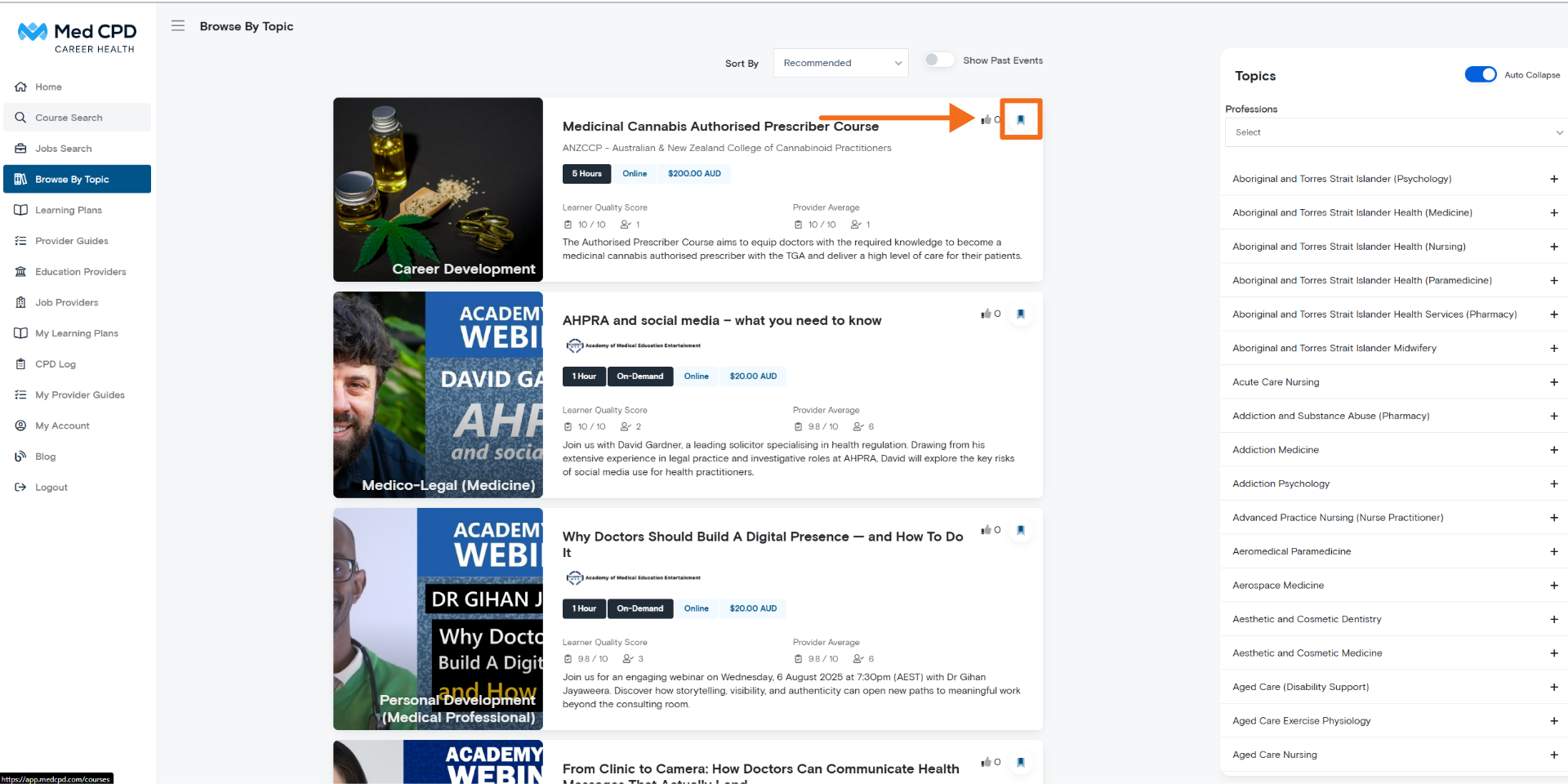
Each listing on the Browse page represents a CPD activity.
You can click on a course card to view more information, including details such as the provider, format, activity description, learning outcomes, and next steps.
You can also bookmark activities using the bookmark icon in the top right corner of each listing.
Bookmarking allows you to save activities you may want to return to later. This is particularly useful if you are:
– Comparing multiple CPD options
– Planning your CPD over time
– Not ready to enrol or access an activity yet
– Building a list of possible activities for future learning
– Reviewing activities before deciding which ones best match your needs
By saving activities as you browse, you can create a more manageable shortlist and return to relevant CPD options when you are ready.
Tips for Finding Relevant CPD Faster
If you are new to Med CPD, a few simple steps can make browsing easier and more effective.
Start with the profession or topic area closest to your current role, clinical work, or professional development goals. This helps narrow the range of activities and makes it easier to find options that may be relevant to you.
Use sorting options to bring different types of activities to the top of the list. For example, you may want to start with Recommended activities, then review newer content or activities with higher learner engagement.
Bookmark anything that looks relevant, even if you are not ready to complete it immediately. You can return to your saved activities later when planning your CPD, comparing options, or reviewing your professional development needs.
Browsing works best when you use it as a way to explore first, then refine. Over time, this can help you build a more structured and manageable approach to CPD planning.
Browse vs Search: Which Should You Use?
Both Browse and Search can help you find CPD activities, but they are designed for different situations.
Use Browse when you want to:
– Explore what CPD activities are available
– Discover new topic areas
– Review courses by profession or area of interest
– Compare multiple options
– Find inspiration for future CPD planning
Use Search when you already know:
– The course title
– The provider name
– A specific topic
– A keyword you want to look for
– The type of activity you need
In simple terms, Search helps you find something specific. Browse helps you discover what is available.
Frequently Asked Questions
Do I need an account to browse CPD courses?
You can access parts of Med CPD without an account. Creating a free account allows you to bookmark activities, save options for later, and manage your CPD activity more easily in one place.
What does LQS mean?
LQS stands for Learner Quality Score. It is a quality-based score that helps users consider learner feedback when reviewing CPD activities.
You can learn more about how this works in the dedicated LQS guide.
Can I enrol in a course directly from the Browse page?
The Browse page allows you to view and compare CPD activities. To enrol, access, or review full details, click through to the individual course page.
From the course page, you can view provider information, activity details, and the next steps for accessing the CPD activity.
Are all CPD activities relevant to my profession?
CPD activities are organised to improve relevance, but you should still review each activity carefully before deciding whether it is suitable for your individual learning needs, professional role, scope of practice, and CPD requirements.
How does Browse help with CPD requirements?
Browse helps you identify CPD activities that may support your continuing professional development. You can explore available options, compare activities, and choose learning that aligns with your professional goals, registration requirements, and development needs.
Can I save CPD activities for later?
Yes. If you have an account, you can bookmark CPD activities and return to them later. This is useful when comparing activities, planning your CPD, or building a shortlist of learning options.
Start Exploring CPD Activities
Browse is a simple way to explore CPD opportunities across Med CPD.
Whether you are looking for a specific area of learning, planning your CPD for the year, or simply seeing what is available, the Browse page helps you discover, compare, and save CPD activities that may support your professional development.
Share to: